Marketing 20/08/2026 Nichita Roilean, Founder 7 min read
Your Logo on a 3D Print: Relief, Colour, or Inset Plate?
How to put a company logo on a 3D printed object so it stays legible and never wears off. Three methods, the minimum dimensions that actually work, and the usual reasons a logo disappoints.
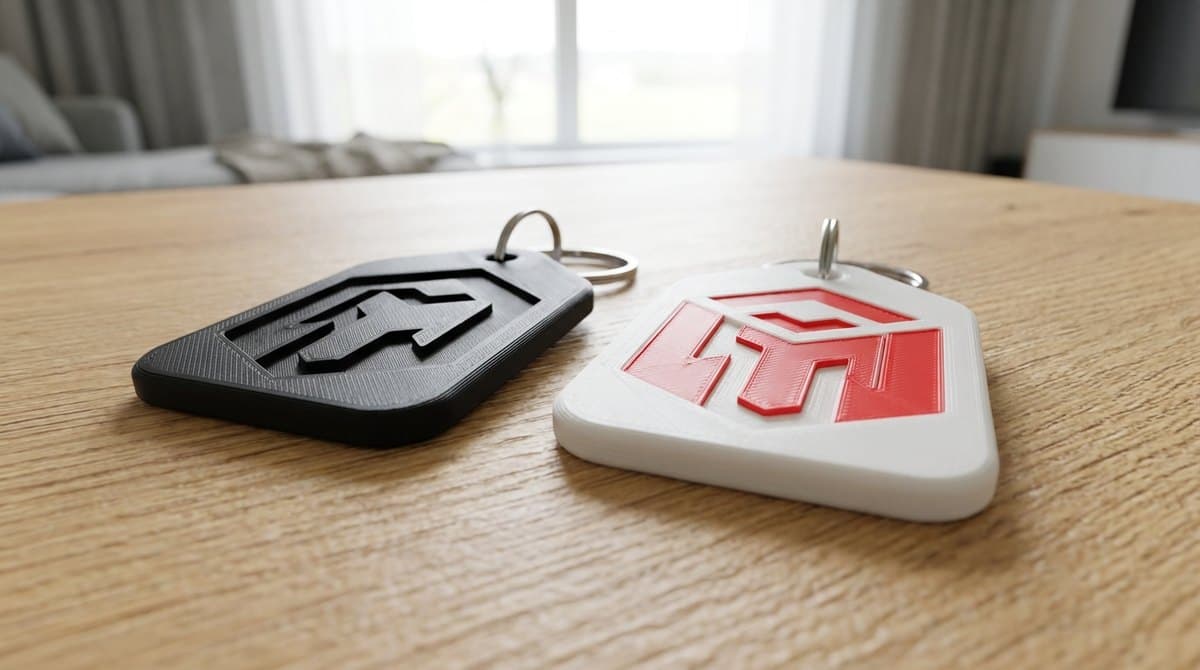
A company logo reaches a 3D printed object in one of three ways: as a raised or recessed relief, as a multi-colour print, or as a separately made inset plate. Relief is the most durable and the cheapest, multi-colour looks cleanest on flat logos, and an inset plate solves the case where a logo carries detail that plastic cannot hold.
What does not make sense in 3D printing is surface printing. Unlike pens or mugs, there is nothing to seal it with on printed plastic — and on a keychain in a pocket it wears off within months. So with 3D printing the logo goes into the shape, not onto it.
The three methods compared
| Relief | Multi-colour | Inset plate | |
|---|---|---|---|
| Durability | highest — the logo is geometry | high — colour runs through the layer | high |
| Contrast | none (shadow creates legibility) | full colour contrast | full |
| Best for | most objects | flat surfaces | fine logos |
| Minimum line width | 0.8 mm | 0.8–1 mm | depends on plate process |
| Effect on price | none | slight | higher |
| Limitation | fine strokes get lost | flat surfaces only, no gradients | extra assembly step |
Relief: the default choice
Relief means the logo is raised above the surface or recessed into it. It appears during printing, costs nothing extra, and cannot be rubbed off because it is part of the part's geometry.
Dimensions that actually work:
- Minimum line width 0.8 mm. That's roughly two adjacent extruded walls. Thinner strokes either get skipped or merge into a shapeless mass.
- Depth or height 0.4–0.6 mm. Shallower disappears; deeper starts to distort the shape on small objects.
- At least 0.8 mm between features. Two close strokes will merge during printing.
Raised or recessed? A raised logo is more legible because it casts a shadow. A recessed one resists abrasion better — nothing protrudes, so nothing rubs. For keychains that knock against keys and coins we usually go recessed; for objects that sit on a desk, raised.
Contrast is relief's one weakness. The logo is the same colour as the rest of the part and only shadow makes it readable. On a matte surface that works well; on a glossy one (Silk variants, say) the effect is weaker.
Multi-colour: when you want the logo in colour
In multi-colour printing the material changes where the logo sits, so the logo really is a different colour. It cannot be rubbed off, because the colour is not on the surface — it is a different plastic.
When it works: the logo is flat, sits on a flat face, and has no gradients or fine shading. Two- and three-colour logos with clearly bounded areas come out excellently.
When it doesn't: logos with a gradient, photographs, or a logo placed on a curved face. The transition between colours happens at a layer boundary, so on a sloped face the edge breaks up into visible steps.
Multi-colour printing sits in the mid and upper price band for promotional products — it affects small runs more noticeably than large ones.
Inset plate: for fine logos
If a logo carries thin serifs, small type, or detail that will not survive at 0.8 mm, it is worth producing the logo separately and setting it into a prepared recess.
It costs more and adds an assembly step, but it solves what neither relief nor multi-colour can: it preserves the exact logo including the details your brand insists on.
The usual reasons a logo disappoints
1. The logo arrives as a raster. JPG or PNG can be worked with, but the edges are soft and it shows in relief. Vector (SVG, AI, EPS, PDF) gives a crisp edge. If you have no vector, say so upfront — conversion is part of preparation.
2. The logo is too fine for the object's size. A logo that looks superb on a business card disappears on a 30 mm keychain. The fix is either a simplified version (mark only, no wordmark) or a bigger object.
3. Text under 3 mm tall. A company name printed smaller than 3 mm is essentially unreadable in relief. On keychains we usually print the symbol alone and drop the name.
4. A logo on a curved face. On a cylindrical or spherical surface the relief distorts and the multi-colour transition breaks up. Always look for a flat facet — and if the object has none, one can be designed in.
5. Expecting an exact colour match. We print from coloured filaments, not mixed paints. A brand shade can be approached but not hit on Pantone. If exact colour is a condition, say so at the start — for some brands it changes the whole approach.
Which material to choose
We print in PLA and PETG, including Silk and Galaxy variants.
- PLA — the sharpest detail and cleanest colours. Best for relief, because fine edges come out more precisely. Ideal for office items.
- PETG — higher heat and impact resistance. Choose it for objects going in a car, outdoors, or into a workshop. Detail is slightly softer than PLA.
- Silk / Galaxy — metallic or shimmering finish without painting. Looks good on awards, but the glossy surface reduces relief legibility — with these we recommend a multi-colour logo instead of relief.
What to send for a quote
To get a sensible quote first time, send:
- The logo in vector, and whether a simplified version exists for small sizes.
- Object type and approximate size — a 30 mm keychain is a different problem from a 120 mm plaque.
- Quantity — volume discounts apply automatically from three pieces, up to 40%.
- Where the object will be used — office, car, outdoors. This decides the material.
Concrete examples with prices are on the keychains with a logo page, where runs from 200 pieces start at 49 CZK (~€2.10) each, and on corporate gifts with a logo.
Frequently asked questions
How small can a logo be and still print?
What matters is the width of the thinnest stroke, not overall size. Below 0.8 mm a stroke disappears. A 15 mm logo is fine as long as its strokes hold that limit.
Will the logo survive daily use?
Yes, for both relief and multi-colour. Both are part of the material rather than a surface treatment. That is exactly why we do not use surface printing — on a keychain it would wear off within months.
Can you match our brand colour exactly?
We get close, but cannot guarantee a Pantone match — we print from stock filaments. If exact shade is a condition, tell us upfront and we will discuss alternatives.
What does adding a logo cost?
For relief, nothing. The logo is part of the geometry, so printing with it takes as long as printing without. Multi-colour and inset plates do increase the price.
Can every piece carry a different name?
Yes, at no extra cost. 3D printing has no changeover cost between pieces — which is why a personalised run costs the same as an identical one.
Conclusion
With 3D printing the logo goes into the shape, not onto the surface — and that is why it lasts. For most objects the right answer is relief at a minimum 0.8 mm line width and 0.4–0.6 mm depth; a coloured logo calls for multi-colour on a flat face; a fine logo calls for an inset plate.
Send the logo in vector along with the object type and we will prepare a proposal. Or upload your own model and see the price immediately.